Enable the RoboXStudio Platform
Key launch checklist (must-read)
Follow this sequence to avoid data issues:
- Request platform access: Get a RoboXStudio account and set permissions (admin/developer/collector).
- Deploy RoboDriver-Server: Complete server deployment and verify connectivity with RoboXStudio.
- Start robot runtime: Bring up the robot environment (ROS1/ROS2 nodes, Dora services, or vendor SDK drivers) and verify the basic data path.
- Start RoboDriver adapters: Run the robot-specific
robodriver_robot_*(device adapter) androbodriver_teleoperator_*(teleoperation) modules to ensure data is received. - Dispatch and execute tasks: Configure and publish capture tasks in RoboXStudio; RoboDriver-Server forwards them to RoboDriver for execution.
System architecture
The embodied intelligence platform around RoboDriver has three core components with clear responsibilities:
| Component | Core responsibilities | Interaction |
|---|---|---|
| RoboDriver | Local robot control, capture task execution, real-time data capture, local playback | Receives tasks/commands from RoboDriver-Server and reports status/raw data |
| RoboDriver-Server | Task/command forwarding, platform command handling, data ingestion/encoding/upload, unified status management | Receives tasks from RoboXStudio, forwards to the target RoboDriver; uploads captured data to storage |
| RoboXStudio | Visual task design, task publishing/distribution, progress monitoring, role-based permissions | Sends tasks to RoboDriver-Server and displays system status and data outputs |
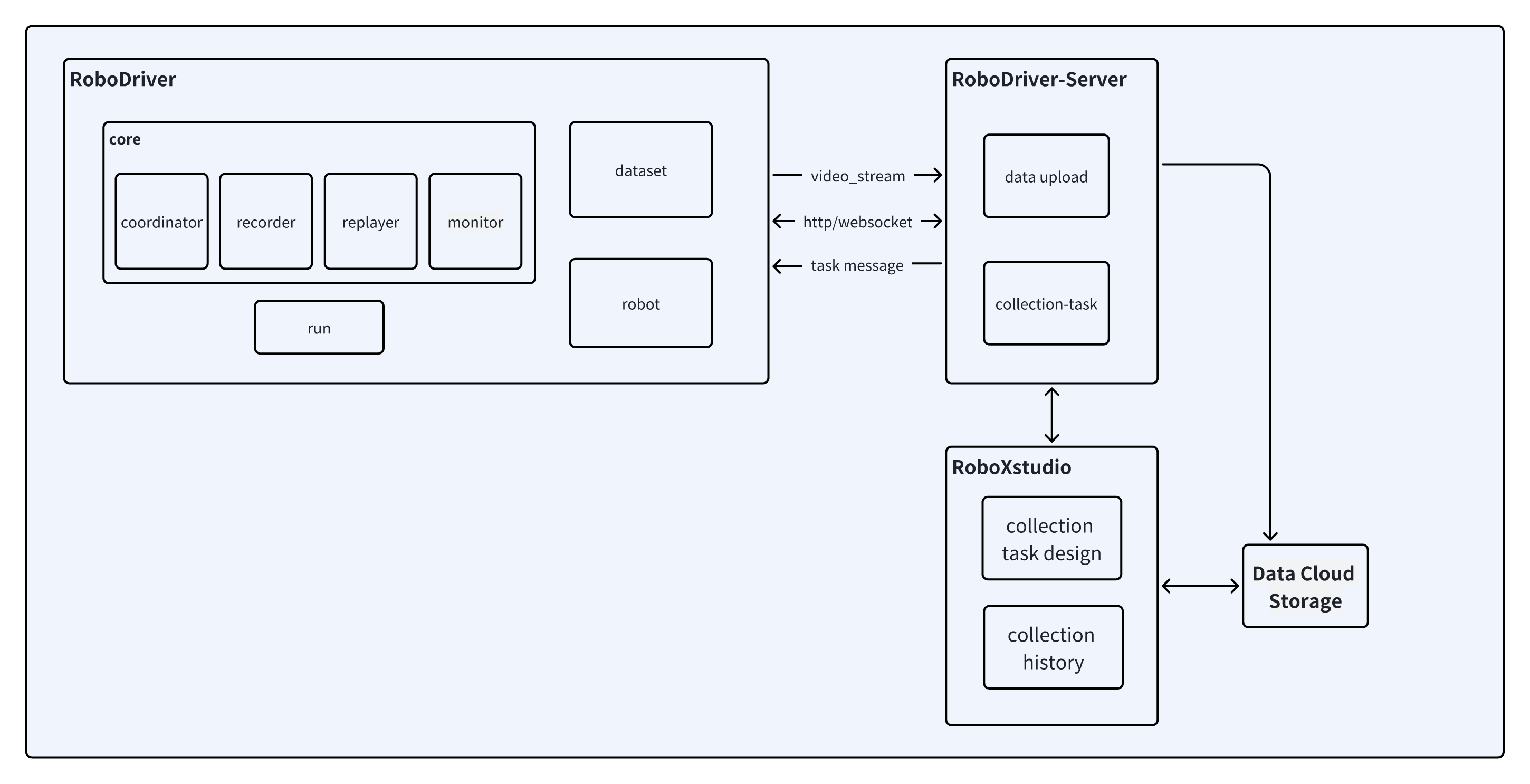
Core workflow
- Design capture tasks in RoboXStudio (frequency, data types, motion sequences) and assign to operators/robot clusters.
- RoboDriver-Server receives the task and forwards capture commands to the target RoboDriver.
- RoboDriver executes the task, capturing sensor/motion data and storing it in the CoRobot format.
- After completion, RoboDriver-Server handles encoding/format conversion and uploads to cloud or designated storage.
- Monitor progress in RoboXStudio or replay locally via RoboDriver for verification.
RoboXStudio usage
Apply for access
https://ei2data.baai.ac.cn/home
Core capabilities
- Visual task design: configure robot type, capture scenarios, and data labels.
- Task publishing and distribution: assign tasks by role.
- End-to-end monitoring: track execution progress and uploads in real time.
- Data management: preview/filter/export captured data; link with labeling tasks.
- Permission management: role-based control for admins/developers/collectors.
Documentation
Full manuals, permission setup, and task design guides: RoboXStudio docs
RoboDriver-Server deployment
Quick start
Core features
- Forward capture tasks/commands and sync status.
- Receive platform tasks/commands from RoboXStudio.
- Ingest data from RoboDriver, handle encoding and standardization.
- Batch/real-time uploads to cloud object storage or local file systems.
- Unified management and reporting of robot online status and capture progress.
Documentation
Notes
- After starting the robot runtime, verify commands like
rostopic list(ROS) /dora status(Dora) return data to ensure connectivity. - After starting RoboDriver adapters, run a local test (e.g., preview capture) before accepting tasks from the platform.
- If tasks do not arrive or uploads fail, first check network connectivity and that components were started in the correct order.